Silicone Protection for Apple Pencil: Cap + Nib Covers and an Anti-Loss Cord That Keeps Pieces Together
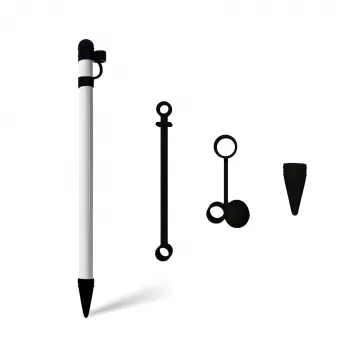
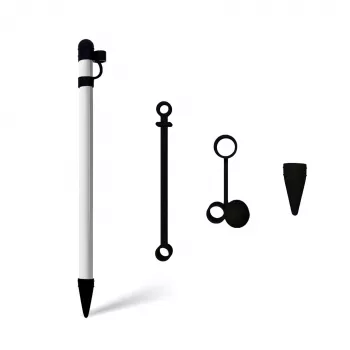
Apple Pencil is one of those tools that’s always in hand—until the moment it rolls off a desk, the cap disappears into a bag, or the tip gets scuffed at the worst time. Our silicone protective case set adds everyday grip and impact buffering, plus dedicated cap and nib covers and an anti-loss cord designed to keep the small, easy-to-misplace parts connected when you’re on the move.
What this set is designed to protect (and why those spots matter)
Most Apple Pencil wear happens in a few predictable places: the barrel from constant contact, the tip area from storage bumps, and the cap from frequent removal. Our team curated this set around those real-life friction points.
- Barrel protection: A silicone sleeve helps reduce cosmetic scuffs from desk contact, backpack carry, and frequent handling.
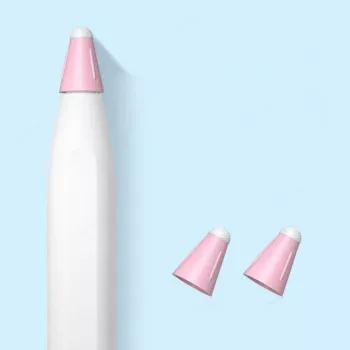
- Tip protection: A nib cover helps shield the tip area when the Pencil is stored, reducing the chance of snagging or minor damage in a pouch or pocket.
- Cap protection: A cap cover helps prevent cap scratches and makes the cap easier to grip when removing or reattaching.
- Piece control: The anti-loss cord is for the most common “where did it go?” moment—separating the cap from the Pencil during use or travel.
Anti-loss cord: small detail, big difference in daily use
If you’ve ever set the cap down “for a second” and watched it vanish into the couch or a tote bag pocket, you already understand why the cord matters. It’s a simple add-on that supports a consistent routine—cap stays connected, so it’s harder to misplace.
- Helps keep cap and Pencil together while working at a café, classroom, studio, or moving between rooms.
- Reduces the chance of cap drops when charging, swapping setups, or pausing mid-task.
- Useful for travel days: when a Pencil is constantly in and out of bags, the cord can be the difference between “packed” and “lost.”
- Works best when the cap is fully seated and the silicone pieces are properly fitted so the cord isn’t under unnecessary tension.
Grip and feel: making Apple Pencil easier to hold for longer sessions
Some people love the original slick finish; others want a more secure feel—especially during long note-taking, sketching, or editing sessions. Silicone changes the handling in a practical way: less slip, more control, and a slightly softer surface.
- Silicone adds a softer, more secure hold compared with bare hard plastic—especially helpful for long note-taking or drawing sessions.
- A slightly cushioned surface can make quick pickup-and-use moments feel more controlled (less slipping on smooth desks).
- If your Pencil tends to roll, silicone texture can help it stay put on gently angled surfaces.
- If you prefer the original slick feel, treat this as a “work mode” add-on: keep it on for sessions, remove it when storing in a tight-fitting slot.
Fast setup: getting the sleeve and covers on cleanly
Silicone fits best when it goes on cleanly and straight. Taking one extra minute up front helps prevent shifting later.
Everyday care: keeping silicone clean and comfortable
At-a-glance: what’s included and what it’s for
Included pieces and their everyday purpose
| Component |
Purpose |
Best time to use |
| Silicone protective sleeve (barrel case) |
Grip and scratch/impact buffering |
Daily use, study, drawing sessions |
| Cap cover |
Adds grip and protects the cap surface |
Whenever the cap is handled or stored in bags |
| Nib cover |
Shields the tip area during storage/transport |
Travel, pencil case storage, desk storage |
| Anti-loss cord |
Keeps cap and Pencil connected to reduce misplacement |
On-the-go use, commuting, classroom/studio work |
Good fit habits: avoiding the most common frustrations
- Confirm your Apple Pencil model before you buy: Different generations have different shapes and charging methods. Apple’s guide can help you identify yours: Apple Support: Identify your Apple Pencil.
- Plan for tight storage spots: If you use a very snug holder, case thickness can change the fit—keep a bare-pencil option available if needed.
- Remove the nib cover before use: For clean performance and normal screen contact, the nib cover is for storage/transport, not active writing.
- Make “cap + cord” your pack-up routine: Small routines prevent most losses, especially when you’re moving between rooms or traveling.
If you’re new to Apple Pencil features and setup basics, Apple’s overview is a helpful refresher: Apple Support: Use Apple Pencil with iPad.
In-stock picks from our store
FAQ
Will a silicone case affect charging or attachment on compatible iPads?
Silicone adds thickness and can change how closely your Pencil contacts a charging or attachment area. If charging or attachment feels weaker, remove the sleeve and try again, or re-seat the sleeve so it isn’t bunched up where contact is needed.
Do I keep the nib cover on while using Apple Pencil?
No—use the nib cover mainly for storage and travel. Remove it before writing or drawing so the tip performs normally and maintains proper screen contact.
How do I know if it fits my Apple Pencil generation?
Start by identifying which Apple Pencil model you own, then match accessories to that generation’s shape and features. If you’re unsure, confirm your Pencil generation first so you don’t end up with a mismatched style.
Recommended for you


Leave a comment